Every job, confirmed.
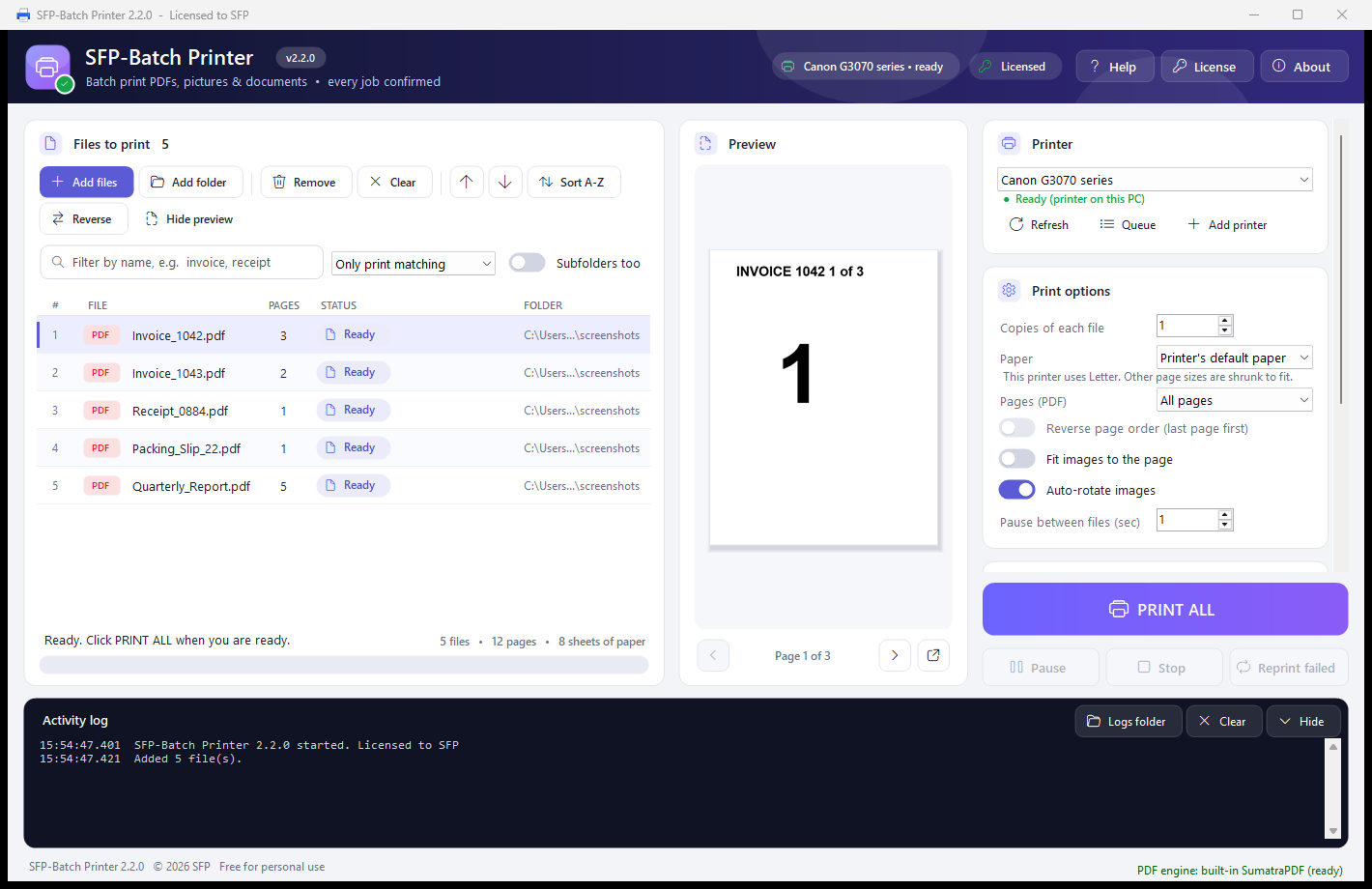
The app follows each file through the Windows print queue and reports Printed, not just Sent - so a stuck job never slips by.
Drop in a folder of PDFs, images or Office files and print them as one job, not dozens. SFPS Batch Printer follows every file through the Windows print queue so you know it actually printed, with a live preview, page selection, a name filter, and manual double-sided printing built in.
Free forever for personal use
Bring printing together as one task, instead of treating every file as a separate job.
The app follows each file through the Windows print queue and reports Printed, not just Sent - so a stuck job never slips by.
A live preview pane plus page selection - all, first page, odd/even, or a custom range like 1-3, 5, 8- - means no surprise copies.
Manual double-sided printing with stack planning and a one-time calibration test, for printers that can't duplex on their own.
Free, but not free at the same time. The full experience remains unrestricted for personal and commercial use.
Free forever for personal use. No feature restrictions, no usage restrictions, and no license purchase required.
A one-time license is 5 CAD per PC - yours to keep, no renewal. Past the 30-day trial the app keeps working on trust while you arrange payment; it is never locked.
“WinRAR model” describes our trust-based approach. SFP Software is independent and is not affiliated with WinRAR.
Free forever for personal use. The same unrestricted experience is available for commercial use on good faith.
Batch printing for PDFs, images, and files.
Download SFPS Batch PrinterCommercial license available on good faith basis. No feature or usage restrictions.
5 CAD, one-time per PC
Commercial pricing and a secure purchase link will appear here when available.
Yes. Free forever for personal use, with no feature or usage restrictions and no license purchase required.
A commercial license is 5 CAD - a one-time purchase per PC, yours to keep. We run on trust: using it commercially past the 30-day trial without having purchased yet still works, the app simply reminds you. Buy whenever you are ready.
PDF, Images (JPG, PNG, BMP, TIFF), Office documents
Windows 10, Windows 11
Use the download section above to get the installer.
No. Any interactive queue demo elsewhere on this site uses illustrative sample filenames only and never accesses your documents or connects to your printer. The screenshot on this page is from the real application.